


 EN
 RU



RolsBet App Download and Installation Guide
RolsBet supports the use of mobile devices for access via web browsers on smartphones/tablets and the RolsBet official app for Android. With these, users can sign up, log in, deposit funds, place bets, play casino games, claim bonuses, complete KYC, or withdraw winnings on the go.
Android users should go to the official website for the RolsBet app download as an APK file, while iOS users have to settle for the PWA. The betting app free download allows users to install and set it up within minutes to get started on RolsBet.
Like the desktop website, the mobile application lets players access the sportsbook to bet on events and fixtures across 40+ sports and esports. It also allows them to visit the casino lobby, choose their favorite games, and play. In this guide, we’ll cover the similarities and differences between the access points, how to install a betting app on Android or iOS devices, safety tips, and more. Install the RolsBet app on a mobile device today.
Contents
- RolsBet App Download and Installation Guide
- A Comparison of RolsBet Mobile Access Routes
- How to Install a Betting APK?
- How to Download Betting App for iPhone?
- How to Navigate the Sportsbook and Casino Library on the App?
- The Recommended Android Device Requirements for the Application
- Can I Use the Mobile App to Register or Log In?
- RolsBet App Updates and Troubleshooting
- Safety Tips for Installing the App
- FAQs
A Comparison of RolsBet Mobile Access Routes
As we mentioned earlier, RolsBet customers can use RolsBet via the mobile web browser, Android APK, PWA, and iOS PWA. The main differences come down to how you access the bookmaker/casino.
| Route | Android app | iOS PWA | Mobile website | Android PWA |
| Installation source | Direct download from the official website as an APK file. | No native app, but users can visit the mobile website and add it to the home screen. | No installation is needed here. Users just need to access the site directly in a browser. | It doesn’t require installation. |
| Features | Sportsbook, casino, account, betting features, responsible gambling tools, etc. | Same as the Android application. | Same as the other routes. | Same as the others. |
| Practical limitations | It must be installed and requires the necessary permissions to function. | It requires a browser to add the site to a home screen and internet access. | It needs a web browser and an internet connection. | It’s the same as the iOS PWA. |
| Storage | It uses the phone’s storage. | Uses minimal storage (cache) compared to a conventional application. | Similar storage needs to the PWA. | Minimal or no storage. |
| Updates | They’re sourced from the official website and installed to replace the current version. | It comes automatically via the website. | It updates automatically when the website has a newer version. | Same as the mobile site and iOS PWA. |
There’s no superior or inferior route, so users can choose based on how often they access RolsBet and their device, storage, and installation needs.
How to Install a Betting APK?
Android users have a dedicated app, but it’s only available through the official website, not on the Google Play Store like many other betting apps. We recommend downloading the application only from the official website. Anything they see on the Play Store with the brand name is a duplicate and should be avoided.
Here are the steps for RolsBet APK download:
- Visit the official website on a phone or tablet (not a mirror or affiliate page).
- Scroll down to ‘Apps’.
- Tap ‘Android’ to download the software.
- Go to Settings > enable ‘Installation From Unknown Sources’.
- Go back to Downloads and tap the APK file.
- Select ‘Install’ and wait for it to finish.
- Return to Settings > disable ’ Installation from Unknown Sources’.
- Launch the mobile betting app and set it up.
Android users who don’t wish to install the dedicated application can opt for the PWA option instead by following these steps:
- Visit the website and wait for the homepage to load.
- Select ‘Add to home screen’ from the menu.
- Tap ‘Add’ in the top-right corner, and it will appear as an app icon on the home screen.
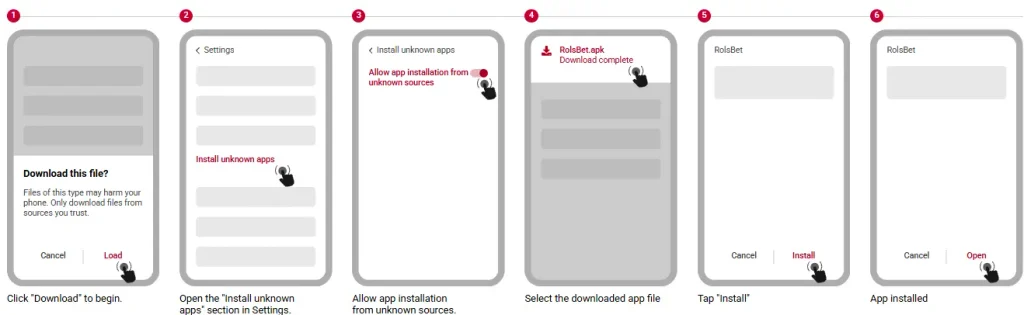
Before one can sign up, log in, deposit, or figure out how RolsBet bonuses work, they need to enable the required permissions first. While RolsBet doesn’t explicitly state what it asks users for, the expected ones are internet/network, storage, and location access.
Sometimes, one may have issues while attempting to download or install the APK file, and here are some of the common ones:
| APK-related issue | What to do? |
|---|---|
| APK won’t download C | heck if there’s internet access and enough storage space to accommodate the file. |
| Installation blocked | Go to installation settings on a phone or tablet and enable installation from unknown sources. |
| App not installed | Make sure the file downloaded correctly, there’s enough space, and the software is compatible with the OS version. |
| RolsBet app not working Check you | r internet connection or try using another device. |
| Suspicious APK warning | If the file isn’t from the official site, don’t bypass the warning or install it. We recommend deleting the application. |
How to Download Betting App for iPhone?
Currently, there’s no native iOS betting app download on the site or App Store, but users can access RolsBet through their mobile website. For quicker access, they can add the site to their home screen as a Progressive Web App.
Here’s how to do that:
- Visit the official mobile betting site on Safari or another supported web browser.
- Tap the Share icon (or the browser menu).
- Select Add to Home Screen to install a shortcut.
- Exit the browser, then tap the icon to open it and interact with RolsBet.
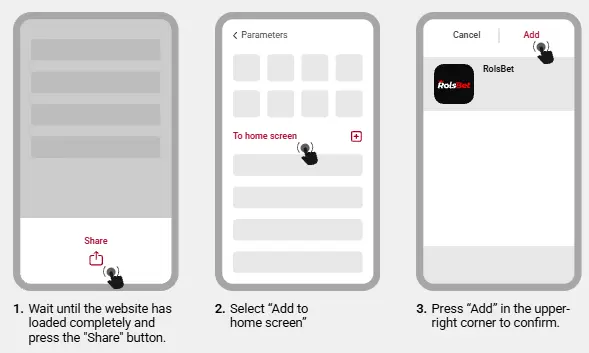
While it isn’t the same as using a native RolsBet iOS app, it grants iOS users faster access to RolsBet and doesn’t require storage space, unlike the Android betting app. The same steps apply to the iPad, although system requirements may differ.
How to Navigate the Sportsbook and Casino Library on the App?
The current RolsBet sports betting app interface shows Sports and Casino as two distinct tabs on the homepage menu, making them easy to find. Users can choose either, depending on why they signed up or what they want to commit their funds to.
Sportsbook Section
Tap the sportsbook if you want to browse and place bets on competitions and fixtures across the available sports. When you select an event to bet on, the page usually shows different betting lines, odds, and potential returns. You can read the sports betting guide for information on how to place a bet or get more details on how the sportsbook works.
Casino Section
The casino section, on the other hand, gives you access to the game library, where you’ll find categories like slots, table games, live dealer options, crash games, and more. Each game has unique mechanics, gameplay rules, and a paytable, which the casino guide covers in more detail.
The interface displays in English by default, but it also supports other languages such as Uzbek, Arabic, French, etc. The screen layout is also optimized for mobile orientation, so navigation is limited to touch and swipe gestures. However, the application sends push notifications (when enabled) to keep users updated on live events, bet settlements, new casino additions, etc.
The Recommended Android Device Requirements for the Application
The RolsBet mobile app doesn’t demand much from mobile devices, but they should meet or exceed these minimum requirements for smooth functioning.
| Specification | Details |
|---|---|
| Operating system | Version 5.0 or more recent |
| Storage space | At least 100 MB |
| Internet connection | Yes (mobile data or WiFi) |
| Processor | At least 1.2 GHz |
| RAM | At least 2GB |
If the device has all these, you can go ahead and install the APK file on it. There are no system requirements for the iOS device due to the lack of a dedicated application. Although the minimum storage space shows 100 MB, we recommend having at least 500 MB because the app cache will eventually increase the file size.
Can I Use the Mobile App to Register or Log In?
Mobile users can access their existing account with ease on their phones or tablets via the web browser or the mobile app. However, how they signed up may determine how they log in. For example, someone who registered via phone may sign in via SMS code or phone number.
Once you open the interface, tap the sign-in button and follow the betting site login guide, which you can find at the bottom and top of the homepage, so it’s hard to miss.
However, if you haven’t created an account yet, learn how to register at RolsBet using any of the four sign-up methods available in the application.
RolsBet App Updates and Troubleshooting
RolsBet members can find the app version they installed in the About or Info section. It helps you know whether you’re using an outdated application or the current one. If it is, RolsBet should notify you of a newer version, or you’ll get a notice when you log in.
You can get the betting app latest version from the same source you installed the existing one from. Go back to the website and tap ‘Android’ under apps to download the latest APK file, then install it over the existing version. Alternatively, you may get a pop-up notification of the betting app update from RolsBet, and you just have to click on it.
RolsBet doesn’t explicitly say whether a new version means the older one will stop working, but we recommend updating for better security and performance.
If the app is not working, here’s what you should do:
- Check the internet connection and switch to WiFi or mobile data to see if a weaker network is causing the freeze.
- Clear the cache and data to remove corrupted files without deleting the application.
- Close and reopen the app.
- Restart the phone.
- Check whether a newer RolsBet version is available.
- Confirm the device has sufficient storage if an update/installation is failing.
- If the problem continues, completely delete the app, restart the device, and download the latest version of the application.
If these don’t work, you can contact support. Then, go to the mobile web browser and sign in to keep using RolsBet while you resolve the issue.
There’s an RolsBet app support feature under ‘consultant’ for those who want to use live chat and ‘contacts’ for those who prefer email or a contact form.
Safety Tips for Installing the App
Is RolsBet app safe? Yes, but it’s critical for users to verify where they’re installing it from, especially since it’s not listed on the Google Play Store. The following tips will help you identify the official source.
- Go to the official RolsBet website and tap its current casino app download link.
- Check the domain carefully before downloading the APK to avoid a mirror page or phishing site.
- Avoid APK directories, file-sharing sites, shortened links, and modified APKs.
- Don’t install a file from an unsolicited message, and pay attention to Android security warnings.
- Carefully review the permissions the application requests, and grant only what’s necessary for its function (storage, network, and location).
- Avoid sharing login credentials with anyone offering assistance with installation.
If you notice anything suspicious while installing the app, stop immediately and contact support to confirm.
FAQs
Is RolsBet Application Available on Google Play or the App Store?
RolsBet’s app is not available on either yet, but Android users can get the official APK file directly from the website. On the other hand, a native betting app for iOS doesn’t exist currently, and its users will stick to the mobile website or add it to the home screen as a PWA.
How to Identify a Genuine Betting App?
Download the file from the official website after checking the URL and watching the permissions it requests. If it asks for something sensitive, like personal data or financial information, uninstall the application immediately.
Can I Use an Older Version of the App?
While the current version may still work, we recommend installing the updated version for better security, improved live updates, synchronization, and to prevent crashes or freezes.
How Do I Check and Update My App Version?
Check the ‘app information’ to know the current version and compare it with what’s on the official website. If the app is older than what’s there, download the current APK file from the website and install it on your device following the process we’ve outlined above.
Can I Use My Existing RolsBet Account in the App?
Yes, you don’t need to create a new profile after installing the app. Simply open it, tap the login button, enter your credentials, and gain access. We strongly advise against opening a duplicate account because it will trigger an automatic security flag.
What Should I Do if Installation Fails or the App Stops Working?
If it’s not installed, go to Settings and enable installation from unknown sources. Alternatively, check storage space (it needs to be more than 100 MB) and verify if the device meets the minimum specifications. If the app crashes or freezes, clear the cache and data, force-stop and restart, check the internet connection, or uninstall and reinstall.